
Xiber NetOS — Infrastructure Revenue & Expense Attribution
Operating model for measuring the financial performance of towers, rooftops, data centers, POPs, carrier hotels, and aggregation facilities.
Purpose
Infrastructure assets are not only places where equipment is installed. They are economic platforms that support revenue-producing services downstream. A rooftop, tower, data center, or aggregation site should be evaluated by the revenue it enables, the direct cost it carries, and the downstream costs required to deliver that revenue.
This guide defines how NetOS should attribute revenue and expenses through infrastructure relationships so the platform can eventually produce a full waterfall view of network economics.
The model separates three concepts:
| Concept | Meaning |
|---|---|
| Physical placement | Where a circuit, radio, or facility endpoint physically lands. Example: circuit A location is BSI 1America. |
| Subtended relationship | Which parent asset economically supports a customer endpoint, circuit, or child facility. Example: BSI 1America subtends Tower A over fiber. |
| Cost source | The object that contributes cost to the relationship. Example: the customer endpoint is served through the Lakota Lakes POP circuit, so the relationship is customer endpoint and the cost source is Circuit: Lakota Lakes POP. |
| Attribution period | The effective date range during which a relationship is financially true. Example: Tower A moved from Parent POP 1 to Parent POP 2 on 2026-05-01. |
The same circuit endpoint can stay physically fixed while the business relationship changes over time.
Relationship Diagram
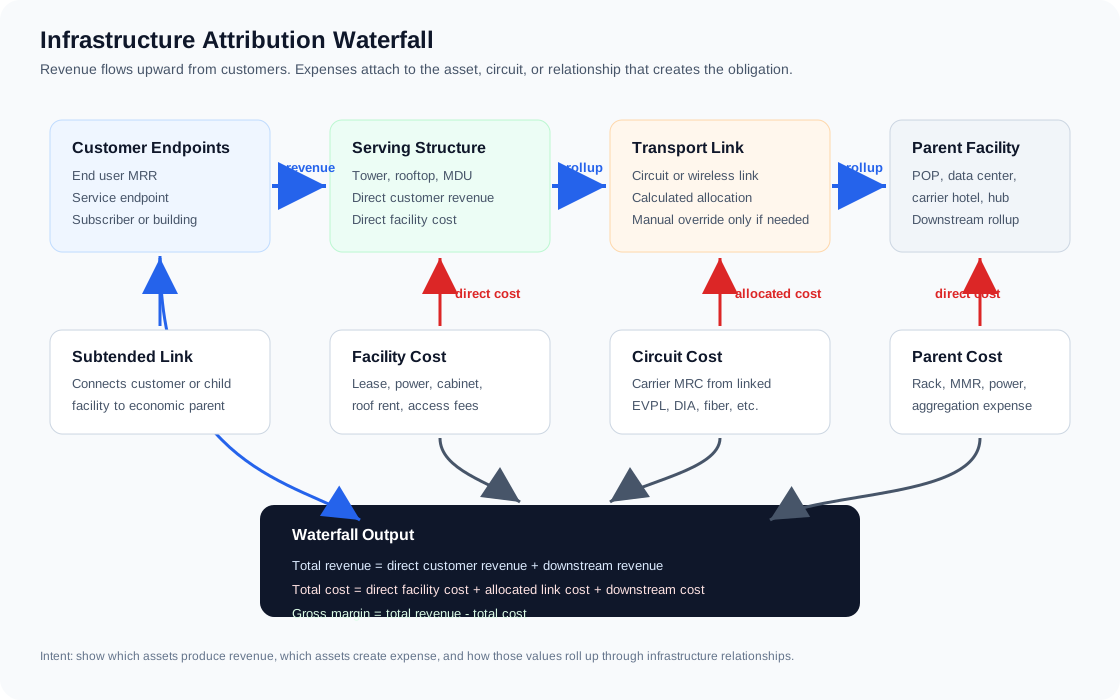
The diagram below shows the intent of the infrastructure attribution tool. Customer revenue is entered at the endpoint or downstream relationship that produces it. Facility costs stay with the asset that owns the obligation. Circuit costs stay on the circuit and are allocated through subtended links when that circuit supports a customer, tower, rooftop, or child facility. The waterfall output rolls those values up to the serving structure, parent facility, market, and portfolio.
Core Objects
Infrastructure Asset
An infrastructure asset is a site, facility, or structure that can carry its own cost and may support downstream revenue. Electrical utility accounts are not infrastructure assets; they are add-on service cost items attached to infrastructure or customer sites.
Examples:
| Asset Type | Examples | Typical Direct Costs |
|---|---|---|
| Tower | owned tower, leased tower, water tower attachment | rent, ground lease, power, backhaul, insurance |
| Rooftop | building rooftop, hotel roof, MDU roof | roof lease, power, access fees |
| Data center | colocation facility, meet-me site | cabinet, cross-connects, power, remote hands |
| POP | aggregation point, hub cabinet, carrier hotel presence | rack, power, transport, cross-connects |
| Carrier hotel | interconnect facility | MMR fees, cross-connects, cabinet |
| Aggregation facility | cabinet, hut, shelter, central office | lease, utility, backhaul |
Current NetOS fields that contribute to direct site cost:
| Field | Meaning |
|---|---|
mrc_usd | Monthly recurring site/facility cost |
nrc_usd | One-time non-recurring site/facility cost |
price_escalator_pct | Contractual recurring cost escalation |
term_end_date | Renewal/expiration date |
agreement_url and documents | Supporting contracts, invoices, floorplans, photos, MSA, service orders |
capex_usd, salvage_value_usd, useful_life_months, depreciation_start_date, depreciation_method | Site CAPEX. Straight-line monthly depreciation is added to site cost next to mrc_usd -- see Site CAPEX and Depreciation |
Infrastructure assets also carry a cost_classification that determines how the facility MRC participates in financial reporting:
| Classification | Waterfall Treatment |
|---|---|
operating | Default state. Facility MRC participates in normal structure economics and inherited donor cost attribution. |
pre_revenue | Facility MRC is held as pre-revenue investment. It does not flow into downstream inherited cost. The asset carries target MRR, breakeven date, decision owner, notes, and optional review/promotion thresholds. |
strategic_redundancy | Facility MRC is held as strategic redundancy investment. It does not flow into customer margin. The asset records the protected asset, SLA justification, and review date. |
market_overhead | Facility MRC contributes to a market-level overhead pool and is excluded from direct structure/customer inherited cost. |
A site's CAPEX depreciation always follows its classification exactly like its facility MRC does: an operating site's depreciation is operating cost that flows down with its rent; a pre-revenue, strategic-redundancy, or market-overhead site's depreciation is added to that same investment bucket and never reaches downstream inherited cost.
This separates steady-state operating margin from deliberate strategic investment. The market waterfall now reports operating revenue, operating cost, and operating margin first. It then deducts pre-revenue investment, strategic redundancy, and market overhead to produce portfolio contribution. Non-operating assets can still appear in topology and inventory, but their facility rent does not distort a downstream tower, POP, or customer margin while the asset is still being justified.
Circuit
A circuit is transport, internet, fiber, cross-connect, or other carrier service. It has its own cost and may connect one infrastructure asset to another, or connect an infrastructure asset to a customer endpoint.
Current NetOS fields that contribute to circuit cost:
| Field | Meaning |
|---|---|
mrc_usd | Monthly recurring carrier cost |
nrc_usd | One-time install or setup charge |
service_type | DIA, broadband, EVPL, EPL, wave, dark fiber, etc. |
| A/Z endpoints | Physical locations where the circuit terminates |
| Agreement documents | Service orders, MSAs, amendments, invoices |
RF Link
An RF Link is wireless transport between an A location and a Z location. It can represent PTP microwave, PtMP sectors, Tarana links, rooftop wireless links, or licensed backhaul. RF Links are separate from carrier circuits because their economics often include equipment CAPEX, tower or rooftop rent, spectrum/licensing data, and customer endpoint service delivered from a structure.
RF Links are built from existing site records and follow the same direction convention as circuits: the A side is the customer or downstream side, and the Z side is closer to the donor/core. For facility-to-facility backhaul, select an A infrastructure asset and a Z infrastructure asset. For customer PtP service, select the customer endpoint and the Z donor facility. NetOS classifies links with a customer endpoint as customer endlinks and links between two infrastructure assets as backhaul. The displayed link name is generated from the A side, Z side, and selected RF system or equipment type so users do not maintain a separate manual name.
When an RF Link is created from an infrastructure asset to a customer endpoint, NetOS should create or update the matching subtended customer endpoint relationship. The relationship remains customer endpoint, but the transport becomes RF (ptp_wireless, ptmp_wireless, or microwave) and the cost source becomes the RF Link. This keeps the hierarchy drilldown clear: the endpoint is the revenue relationship, and the RF Link is the wireless transport/cost source serving it.
Current NetOS fields that contribute to RF Link attribution:
| Field | Meaning |
|---|---|
rf_system_id and equipment_type | RF system standard selected from Admin, plus the radio, antenna, sector, or platform used by the link |
network_role | Generated role: customer endlink when one endpoint is a customer, or backhaul when both endpoints are infrastructure |
path_role and diversity_group | Primary, secondary, backup, diverse, or grouped path metadata used to distinguish parallel connectivity |
map_color | Optional display hint for differentiating multiple links that follow the same visual path |
frequency_mhz and channel_width_mhz | Spectrum used by the path |
bandwidth_mbps | Capacity available on the RF path |
capex_usd | One-time equipment or construction cost, tracked separately from monthly margin |
salvage_value_usd, useful_life_months, depreciation_start_date | Inputs for straight-line monthly depreciation |
mrc_usd | Monthly recurring non-rent RF cost, if any |
tower_rent_mrc_usd | Monthly rent incurred because this RF link uses a tower or rooftop |
fcc_call_sign and documents | License reference and uploaded FCC license or coordination documents |
| A/Z locations | Existing infrastructure assets, with customer records acting as customer-site Z endpoints |
For monthly waterfall reporting, NetOS treats RF Link MRC plus tower rent MRC as calculated link cost. CAPEX remains visible on the RF Link and NetOS calculates straight-line monthly depreciation when useful life data is present. Depreciation is an asset-cost lens, not a cash-cost replacement for MRC.
RF system standards live in Admin. Each RF system has a name, description, frequency used, capacity, cost, PTP/PtMP type, and equipment role. PtMP inventory is split into base/sector systems and subscriber/client systems. Infrastructure assets host PtMP nodes using base/sector systems, such as a Tarana BN, Siklu Terragraph DN, or Cambium ePMP AP. RF Links created from those PtMP nodes use compatible subscriber systems, such as Tarana RN/RNv, Siklu T280/T265, or Cambium Force 4600c. When a user selects a PtMP source node, NetOS limits the RF Link subscriber selector to radios compatible with that base system and preloads equipment, capacity, and CAPEX defaults. These are starting values; the actual saved CAPEX should be adjusted to match the bill of materials, labor, and site-specific installation cost.
For PtMP customer endlinks, NetOS filters the customer endpoint selector to mapped customer sites within 10 miles of the selected PtMP source node. Users can select multiple nearby customer endpoints and create one RF Link per selected customer in a single add action. Customers without valid coordinates are not shown in this PtMP proximity selector until their address or latitude/longitude is corrected.
When a site has multiple paths, create separate circuits and RF Links for each physical or logical path. Use path_role for operating intent, such as primary or backup, and diversity_group for paths that should be evaluated together. On maps, parallel lines that share an A/Z path should be visually separated by path role, color, and slight line offsets so primary, secondary, and backup paths remain distinguishable.
The same downstream structure can have multiple active subtended relationships to the same parent when each relationship has a distinct circuit or RF Link. This represents redundant transport such as two fibers, fiber plus RF, or primary and backup paths. Reporting should count the downstream structure's own revenue, facility cost, and child rollup once, then add the cost of every active transport path between the parent and downstream structure. A downstream structure should not be active under two different parent sites *as primary* for the same period unless the old relationship is ended and a new effective-dated relationship is created; additional parents are allowed as backup donors (redundancy_role = secondary, see Backup donors for a downstream structure below).
Electrical Service
An electrical service is a utility account or site power service attached to an existing infrastructure asset or customer site. It is separate from infrastructure because the service is an operating cost item, not a structure in the network hierarchy.
Current NetOS fields that contribute to electrical service cost:
| Field | Meaning |
|---|---|
provider_id | Electrical service provider selected from existing service providers |
infrastructure_id or customer_id | Exactly one site where the electrical service is delivered |
service_type | Commercial power, house power, dedicated meter, generator, solar, battery backup, or other service |
account_number and meter_number | Utility account and meter identifiers |
service_voltage, service_amperage, phase | Electrical characteristics for the delivered service |
delivery_location and service address | Where at the site the service is delivered |
average_monthly_cost_usd | Monthly cost used for attribution until actual bill data is integrated |
start_date | Service start date |
monitoring_url | Utility portal, metering, generator, UPS, or power monitoring link |
| Documents | Sample bills, invoices, service agreements, meter photos, and supporting documents |
For attribution, electrical service cost should roll into the site it is attached to. If the service is attached to an infrastructure asset, it increases the direct site cost of that asset. If the service is attached to a customer site, it increases the customer endpoint cost. This keeps the physical hierarchy clean while still capturing the recurring cost required to operate the site.
Infrastructure and customer detail pages should show attached electrical services next to the other related services for that site. Users should be able to see the provider, account, meter, service characteristics, average monthly cost, monitoring link, and uploaded bills or supporting documents without leaving the site detail context.
Customer
A customer is the revenue owner for an endpoint-style service. NetOS separates customers from circuits and RF Links so the same commercial account or MFC property can have multiple paths, multiple services, and multiple supporting assets.
Commercial customer records describe the sold service. DIA and PTP include capacity because they are transport products. OTT services such as VoIP, IPTV, managed WiFi, and managed security are tracked as service flags on the customer. Customer records also carry contracted MRR, install NRC, and revenue source. MFC customer records describe the property model, including address, tenant count, access technology, property owner, property manager, and access rules.
Circuits, RF Links, and subtended links can reference customer_id. That selector should be preferred when the endpoint customer already exists. Free-form customer names remain useful for discovery records that have not yet been normalized into a customer record.
Customers also carry address and coordinates because they can act as the customer-site Z location for circuits and RF Links. This lets the map show customer sites alongside infrastructure assets and lets RF Links terminate at either a facility, a free-form Z location, or a customer site.
Revenue precedence is explicit: subtended link revenue_mrr_usd is the override when entered. If the customer has no explicit subtended link revenue, NetOS uses the customer's contracted MRR once for the customer summary. A link marked as a redundant/backup path (redundancy_role = secondary) is the exception: it contributes zero implicit revenue so the contracted MRR is not credited twice, though an explicit revenue_mrr_usd override on the backup link is still honored (see Redundant / Backup Links below). When several protected or parallel paths serve the same customer and no explicit path revenue is entered, the serving path table displays the fallback MRR evenly across paths for readability, but the customer financial summary does not multiply the customer revenue by the path count. This allows quick customer-site setup while preserving precise per-link revenue when a customer has multiple services.
Customer detail pages are the endpoint drilldown for the waterfall model. When a user clicks a customer endpoint in the hierarchy, subtended network list, dashboard attribution, or financial view, NetOS opens that customer and shows:
| Customer Detail Section | Meaning |
|---|---|
| Customer Revenue | Contracted MRR from the customer record, unless a subtended link revenue override is present |
| Direct Serving Cost | Cost of the circuit or RF Link directly serving the customer endpoint |
| Inherited Donor Cost | Allocated share of shared facility MRC and upstream donor paths that feed the POP, tower, rooftop, or facility serving the customer |
| Total Attributed Cost | Direct serving cost plus inherited donor cost, maintenance reserve, and commission when present |
| Gross Margin | Customer revenue minus total attributed cost |
| Serving Paths | The donor structure, transport type, circuit/RF source, revenue, and cost for each path serving the customer |
| ROI Analysis | Customer revenue and attributed cost projected against total build CAPEX and serving path costs over 2-, 3-, 5-, and 10-year terms |
The inherited donor cost model defaults to revenue pro rata allocation at each structure in the serving chain. If a POP has $500 of facility MRC and an upstream circuit costing $1,000 MRC, and that POP serves $10,000 of unique active customer MRR, a customer generating $1,500 MRR inherits 15% of the POP facility cost and 15% of the upstream circuit cost. If the POP itself is fed by a core site, the customer also inherits a revenue pro rata share of the core site's facility MRC using total customer revenue generated under that core site. This is explicit in the UI as revenue_pro_rata. It applies to shared circuits, RF transport, tower or rooftop rent represented through RF Link monthly cost, and facility rent/MRC.
Users can override inherited cost allocation on the subtended relationship when revenue pro rata is not the right driver. The default should remain revenue_pro_rata unless there is a documented reason to use a different method. manual_pct applies the entered inherited allocation percentage to upstream facility and donor path cost. equal_share divides the inherited cost across the active revenue endpoints under that structure. direct assigns 100% of the inherited shared cost to the relationship. Customer inherited cost detail shows the method and percentage used for each row so manually adjusted attribution remains auditable.
ROI Analysis treats RF Link capex_usd when present plus customer property CAPEX as the upfront investment required to serve the customer. This keeps the model useful for RF-fed customers, circuit-fed customers with property build costs, and redundant serving paths with their own payoff requirements. Customer install NRC is treated as upfront revenue that offsets the payback requirement. The ROI table is a snapshot model: it adds an 8% annual RF CAPEX maintenance reserve when RF CAPEX exists plus any customer maintenance reserve MRC as monthly OPEX, generates monthly revenue from contracted MRR, term years, term start/end dates, revenue escalator, and ramp months, subtracts commission as either a percentage of monthly revenue or a fixed monthly dollar amount, and compounds direct serving cost plus inherited donor cost upward by 3% annually starting in year 2. The ROI detail separates serving cost, maintenance reserve, commission, total attributed cost, and margin before CAPEX so the assumptions can be audited. The monthly schedule uses the same variables by month. Net cash after CAPEX is the sum of monthly escalated contribution margin plus install NRC minus total build CAPEX; ROI percentage is net cash after CAPEX divided by total build CAPEX. IRR uses the monthly cash-flow stream of upfront NRC less total build CAPEX at month 0 followed by monthly contribution margin for the selected term. NPV uses the same cash flows with a 10% annual discount rate. Margin multiple is total contribution margin before CAPEX divided by total build CAPEX. If there is no build CAPEX, NetOS still shows net cash, but ROI percentage, CAPEX/ARR, margin multiple, and IRR are not meaningful.
The customer detail What If calculator is intentionally not stored. It reuses the customer revenue schedule and lets the user enter a hypothetical Type 2 circuit, alternate RF build, or renewal scenario. This supports conversion decisions such as comparing an owned RF build against a leased circuit by modeling alternate monthly transport cost, build CAPEX, monthly OPEX/reserve, install NRC, and commission assumptions.
Subtended Link
A subtended link is the economic relationship between a parent infrastructure asset and a downstream revenue source or downstream asset.
Current NetOS fields:
| Field | Meaning |
|---|---|
parent_infrastructure_id | The structure/facility receiving attribution credit |
downstream_infrastructure_id | Optional child structure/facility that rolls up to the parent |
circuit_id | Optional circuit used by or associated with the relationship |
rf_link_id | Optional RF Link serving a customer endpoint or downstream asset |
customer_id | Optional customer record receiving or producing the endpoint service |
customer_name | End customer or account name when the endpoint is customer revenue |
endpoint_name | Site, subscriber, building, or endpoint served |
relationship_type | Customer endpoint, child structure, backhaul, aggregation, etc. |
transport_type | Fiber, PTP wireless, PtMP wireless, DIA, broadband, cross-connect, etc. |
revenue_mrr_usd | Direct monthly revenue attributed to this link; overrides customer contracted MRR |
cost_mrc_usd | Manual monthly cost override for this link when calculated allocation is unavailable or intentionally overridden |
effective_from | First date the relationship is financially active |
effective_to | Last date the relationship is financially active |
allocation_method | How shared revenue/cost should be allocated |
allocation_pct | Percent applied when using percentage allocation |
inherited_allocation_method | How upstream facility and donor path cost should be attributed; defaults to revenue_pro_rata |
inherited_allocation_pct | Percent applied when inherited_allocation_method is manual_pct |
redundancy_role | primary, secondary, or standalone. Marks whether this link is the primary path or a redundant/backup path. Only secondary changes attribution behavior (see Redundant / Backup Links below); blank/primary/standalone all behave as a normal primary path |
reparented_from_link_id | Prior relationship when a child/customer moves to a different parent |
On an infrastructure detail page, the same relationship is shown from two directions:
| View | Meaning |
|---|---|
| Subtended Network | What this site serves downstream: customers, child structures, RF links, and circuits. |
| Upstream Donor & Paths | What serves this site upstream: donor structure, transport path, and attributed path cost. |
| Structure Financial Summary | The site-level financial view: upstream path cost, direct facility cost, downstream path/customer revenue, downstream cost, total cost, and margin. |
Example: if BSI US Bank Cincinnati subtends Lakota Lakes POP over an Altafiber EVPL circuit, the BSI page shows Lakota Lakes POP in its subtended network. The Lakota page shows BSI US Bank Cincinnati as the upstream donor and the Altafiber circuit as the path/cost source.
The structure detail summary includes the upstream path cost for the site being viewed. Parent portfolio rollups do not double count that same path: the parent sees the parent-to-child path as its direct link cost, while the child detail page shows the same path as its upstream cost.
Redundant / Backup Links
A customer endpoint can be attributed to a primary facility and, at the same time, have a redundant or backup path from a second facility. This models real protected service: two diverse paths so the customer stays up if one fails. When adding the second path, mark it Redundant / backup link in the Subtended Network form. NetOS records redundancy_role = secondary on that link.
The point of the redundancy role is to attribute the backup path honestly without double counting revenue:
- Costs still flow to the backup facility. The backup link's transport cost (its circuit MRC, or RF Link MRC plus tower rent) is real spend and is attributed to the facility that carries it, exactly like any other link. Redundancy never makes a cost disappear.
- The backup contributes zero implicit revenue. The customer's contracted MRR is already credited once, through the primary link at the primary facility. A
secondarylink does not pull the customer's contracted MRR into the backup facility a second time. Without this rule, a customer with two paths would appear to earn its MRR twice and both facilities would look artificially profitable. - An explicit revenue override is still honored. If you deliberately enter
revenue_mrr_usdon the backup link (for example, the backup path carries its own separately billed standby charge), that entered value is used as-is. The zero-revenue rule only applies to the *implicit* contracted-MRR fallback, not to a number you typed in.
Because of this, a backup link normally shows revenue of $0, its own transport cost, and a negative margin in isolation. That is expected and correct: the second path is a protection cost against revenue that is booked at the primary facility. The customer's overall margin, which pays for both paths out of one MRR, is visible on the customer detail page where both serving paths are listed together.
The Backup badge appears on any link with redundancy_role = secondary in both the Subtended Network and Upstream Donor & Paths panels, so the redundant path is easy to spot.
NetOS blocks a customer from being actively attributed to two different parent facilities for the same period, to prevent accidental double counting. Marking the second link as redundant is the one case that is allowed through: the customer keeps its primary attribution at the first facility and gains a marked backup path at the second. A same-facility duplicate is never relaxed this way. The same rule applies when an RF Link is created to a customer that is already served elsewhere: marking it redundant creates the matching secondary customer endlink at the backup facility. (The redundancy_role column also allows a standalone value, but the UI does not expose it and the economics treat anything other than secondary as a normal primary path.)
Backup donors for a downstream structure
A downstream structure (a rooftop, tower, POP) can also be fed by more than one donor facility -- e.g. Majestic Building fed by GOLD (primary) and by an RF link from BSI 1America (backup). The rule mirrors customers: exactly one primary donor (redundancy_role blank/primary) and any number of backup donors (secondary). A second donor is rejected unless it is marked backup (or every other donor is already a backup); cycles and same-parent duplicates are still rejected for every donor.
Economics for a backup structure donor (is_secondary_structure_link in app/services/infrastructure_economics.py, applied identically in the dashboard and customer detail):
- Revenue and the downstream subtree roll up only through the primary donor. The backup donor's rollup never includes the structure's revenue, customers, or downstream costs, so an ancestor that reaches the structure through both donors never counts it twice. The dashboard attribution tree shows the backup path as a leaf ("Backup Donor Path") with $0 revenue and only its own transport cost.
- Inherited cost pools flow only through the primary donor. The structure (and its customers) inherit the primary donor's pool; a backup link takes no share of its own donor's pool, so that donor's other children keep exactly the shares they had.
- The backup link's own transport cost is counted once -- in the backup donor's direct link cost, broken out as redundancy spend (
redundant_link_cost_mrc_usdin rollups,redundant_upstream_cost_mrc_usdon the downstream structure's detail,redundant_path_cost_mrc_usdon the dashboard, where it is added once to the attributed cash cost). It is never added to the downstream structure's upstream/inherited cost.
Adding a backup donor therefore changes no revenue and no inherited cost anywhere; the only change in totals is that link's own cost.
The RF-link and circuit auto-hierarchy creates a second donor as backup automatically (RF path_role secondary/backup, or circuit redundancy_role secondary, map straight to backup). When the transport still says it is the primary path, the link is created as a backup and the Network review page raises an informational "Second primary donor -- choose which is primary" item with Make this the primary donor / Keep as backup. Make primary (Subtended Network, Upstream Paths, or the review page) demotes the current primary to backup in the same transaction, mirrors the choice onto the RF link's path_role / circuit's redundancy_role, and is audited (set_subtended_link_redundancy_role). An RF link or circuit whose site pair already exists in the hierarchy in the opposite direction is a direction conflict ("Opposite of existing hierarchy link ..."), never a match.
The Serving Path panel lists every donor path: Path 1 is the primary; backups and any dashed "unconfirmed" donors (never-reviewed RF links or circuits not yet in the hierarchy) follow.
Attribution Principles
1. Attribute Revenue to the Structure That Enables Service
Revenue should be assigned to the lowest infrastructure asset that directly enables the service, then roll up through parents.
Example:
| Relationship | Direct Revenue |
|---|---|
| Tower A -> Customer 1 | $500 MRR |
| Tower A -> Customer 2 | $750 MRR |
| POP 1 -> Tower A | $0 direct revenue, but receives Tower A rollup |
Tower A gets $1,250 direct revenue. POP 1 gets $1,250 downstream revenue through Tower A.
2. Keep Facility Costs on the Asset That Owns the Obligation
Facility lease, cabinet, power, roof rent, or tower rent belongs to the asset that has the obligation.
Example:
| Asset | Direct Facility Cost |
|---|---|
| Rooftop A | $350 MRC roof lease |
| POP 1 | $1,800 MRC cabinet and power |
The rooftop cost stays on Rooftop A. POP 1 only receives it as downstream cost if Rooftop A is subtended by POP 1.
3. Keep Circuit, RF Link, and Electrical Costs on the Source Record, Then Allocate Through the Relationship
Circuit MRC belongs to the circuit record. RF Link MRC, tower rent MRC, and CAPEX belong to the RF Link record. Electrical service average monthly cost belongs to the electrical service record attached to the site. A subtended link can reference the transport source to explain which circuit or RF Link supports the relationship, while site summaries include attached electrical services as add-on cost.
In the hierarchy drilldown, NetOS should distinguish the relationship from the cost source. A row may be a customer endpoint, downstream structure, or backhaul relationship, while the cost source may be a circuit, RF Link, electrical service, or manual override. This makes it clear what the node represents and which object is contributing cost to that segment of the network.
NetOS should calculate the attributed link cost automatically when it has the required driver data. Users should select the allocation method and provide the needed driver, such as allocation percentage, committed bandwidth, or subscriber count. Manual link cost should be treated as an override or fallback, not the normal workflow.
Attribution depends on how the circuit or RF Link is used:
| Use Case | Recommended Allocation |
|---|---|
| Circuit serves one downstream endpoint | Direct allocation, 100% of linked circuit MRC |
| RF Link serves one customer endpoint | Direct allocation, 100% of RF Link MRC plus tower rent MRC |
| Circuit serves multiple customers on one tower | Calculate by revenue share or subscriber count |
| PtMP sector serves multiple customers | Calculate by revenue share, bandwidth share, or subscriber count |
| Backhaul circuit serves a child tower | Direct to child structure, then roll up |
| Aggregation circuit supports many facilities | Calculate by bandwidth, revenue, or configured percentage |
| Cross-connect supports one carrier handoff | Direct to the relevant circuit or facility |
4. Never Rewrite History When Relationships Change
When a child facility or customer endpoint moves from one parent to another:
- Set
effective_toon the old subtended link. - Create a new subtended link under the new parent.
- Set
reparented_from_link_idon the new link. - Leave circuit endpoint history intact unless the physical circuit endpoint actually changed.
This preserves historical reporting and makes month-by-month waterfall views possible.
5. One Active Attribution Parent per Target
A circuit, RF Link, customer record, or downstream infrastructure asset should not be active under two parents for the same reporting period. NetOS blocks overlapping active assignments so revenue and cost are not counted twice in the hierarchy. The one exception is a marked backup path: a customer, property, or downstream structure may have additional parents whose link is redundancy_role = secondary (exactly one primary) -- see Redundant / Backup Links above.
To move an attributed target:
- Edit the existing subtended relationship and set
effective_toto the last valid date. - Add the target under the new parent with a later
effective_fromdate. - Use
reparented_from_link_idwhen preserving the explicit move history is important.
NetOS also blocks circular hierarchy assignments, such as making a parent facility subtended by one of its own children.
Standard Rollup Formula
For each infrastructure asset:
direct_revenue = sum(active subtended link revenue_mrr_usd, or customer contracted_mrr_usd when link revenue is blank)
direct_link_cost = sum(active subtended link cost_mrc_usd)
direct_facility_cost = infrastructure.mrc_usd
direct_depreciation = site_monthly_depreciation(infrastructure)   # 0 without CAPEX

downstream_revenue = sum(child infrastructure total_revenue)
downstream_cost = sum(child infrastructure total_cost)

total_revenue = direct_revenue + downstream_revenue
total_cost = direct_facility_cost + direct_depreciation + direct_link_cost + downstream_cost
depreciation = direct_depreciation + sum(child infrastructure depreciation)
gross_margin = total_revenue - total_cost          # = margin_after_depreciation
operating_margin = gross_margin + depreciation      # EBITDA-style, before depreciation
gross_margin_pct = gross_margin / total_revenue(direct_facility_cost / direct_depreciation are zero for a non-operating site; its rent + depreciation are reported in its investment bucket instead.)
The current NetOS implementation uses this structure for infrastructure economics. Future versions should apply the same logic by accounting period and allocation method.
Site CAPEX and Depreciation
Admin request: *"I need a number to plug in for CAPEX for infrastructure sites so that we can update the financial calculations."* Each infrastructure asset carries (migration 0082_site_capex):
| Field | Meaning |
|---|---|
capex_usd | Capital spent to build/equip the site (>= 0). Blank = no CAPEX; nothing changes. |
salvage_value_usd | Expected residual value (>= 0, default 0). |
useful_life_months | Depreciation life (> 0). Blank = 120 months (10 years) when CAPEX is set. |
depreciation_start_date | Blank = the facility agreement's effective_date, else the record's created date. |
depreciation_method | straight_line (the only method). |
site_monthly_depreciation = (capex - salvage) / useful_life_months
                            while start <= today < start + useful_life_months, else 0
The helper is app.services.infrastructure_economics.site_monthly_depreciation; every consumer calls it.
How it flows. Depreciation is a separate cost component that sits next to facility MRC everywhere facility MRC enters cost, and it uses the exact same allocation:
| Surface | Treatment |
|---|---|
Site rollup (GET /infrastructure/{id} → economics) | direct_depreciation_mrc_usd joins total_cost_mrc_usd; subtree depreciation_mrc_usd, operating_margin_usd (before), margin_after_depreciation_usd (= gross_margin_usd). |
| Inherited cost pool | The site's depreciation is added to the pool its downstream structures/customers share, with the same inherited_pool_share as rent (inherited_depreciation_pool_mrc_usd breaks it out). The shares of X/N across a donor's children sum to exactly X/N. |
| Dashboard attribution | Customer rows: inherited_donor_cost_mrc_usd/cost_mrc_usd include the donor sites' depreciation share (inherited_depreciation_mrc_usd, operating_margin_usd, margin_after_depreciation_usd). Structure rows: own depreciation_mrc_usd + inherited, in total_cost_mrc_usd. KPIs: attributed_cash_cost_mrc_usd stays cash-only; attributed_depreciation_mrc_usd is beside it; attributed_margin_usd is after depreciation, attributed_operating_margin_usd before. infrastructure_depreciation_usd is the portfolio total (all classifications). The attribution tree shows a "Site CAPEX depreciation" expense line. |
| Market waterfall | Operating sites: operating_cost stays cash, operating_depreciation is deducted to give operating_margin_after_depreciation, and portfolio contribution starts from that. Non-operating sites: rent + depreciation in their investment bucket (monthly_cost, with monthly_depreciation broken out). |
| Customer detail | A separate inherited donor cost row (source_type: "depreciation", "<site> CAPEX depreciation") next to the facility MRC row, same allocation; financial_summary.inherited_depreciation_mrc_usd. |
Payback and ROI (per site with CAPEX, on the detail page and the Financial view's Infrastructure Economics table):
payback_months = capex / subtree operating margin (before depreciation)   # null + "never" if margin <= 0
roi_pct        = subtree margin after depreciation x 12 / capex x 100     # annualized
The basis is the site's rolled-up served subtree (its own direct revenue/cost, every primary downstream structure and customer, plus the upstream path cost into the site) -- a site exists to serve its subtree, so the subtree's margin is what pays its CAPEX back. The UI labels it "Payback (Served Subtree)". The site's own rent and depreciation always count in these two numbers, whatever its classification, so a pre-revenue site's payback is measured the same way as an operating one. Caveat: if downstream sites also carry CAPEX, their depreciation reduces the subtree margin used for this site's ROI, but their CAPEX is not added to this site's denominator.
RF links are unchanged. RF link CAPEX/depreciation is still reported only as the dashboard rf_link_depreciation_usd KPI, not in margins: 176 live RF links already carry CAPEX, so folding their depreciation into link cost would change every current margin on deploy, and customer ROI already counts RF CAPEX up front (plus an 8% maintenance reserve), so adding it again as recurring cost would double-count.
With no CAPEX entered anywhere every existing number is unchanged (pinned by tests/test_site_capex.py).
Allocation Methods
Allocation methods should produce calculated cost whenever NetOS has enough data.
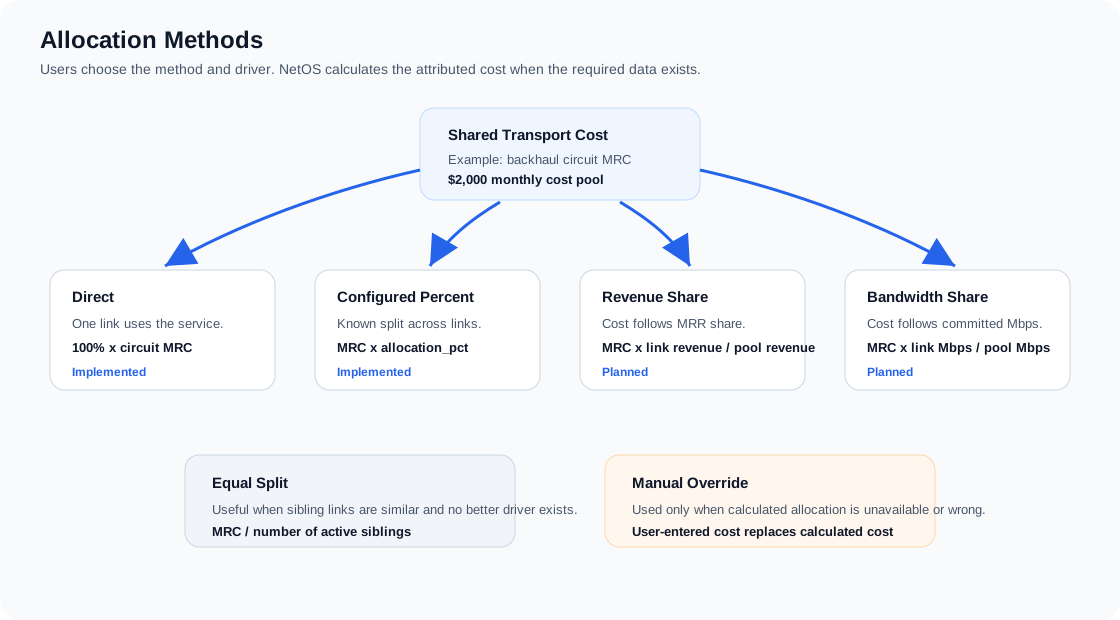
Current implemented behavior:
| Method | Calculation |
|---|---|
direct | 100% of linked circuit MRC unless a manual override is entered |
manual_pct | linked circuit MRC multiplied by allocation_pct unless a manual override is entered |
revenue_share | Uses full linked source MRC until revenue-share driver fields are modeled |
bandwidth_share | Uses full linked source MRC until committed or measured bandwidth driver fields are modeled |
equal | Uses full linked source MRC until sibling relationship group driver fields are modeled |
The Subtended Network form shows a calculated direct link cost preview. When a manual override is entered, the override wins. When manual_pct is selected, the percentage controls the attributed cost. When a future method such as bandwidth_share, revenue_share, or equal is selected before its driver fields are modeled, NetOS uses the full linked source MRC rather than dropping the transport cost to zero.
Inherited shared cost allocation is separate from direct link-cost allocation. The subtended network list shows both the inherited attribution method and the calculated inherited cost applied to each relationship. The form includes a live inherited cost calculator that recalculates on each form change. It compares all inherited methods side by side using the current relationship revenue or downstream structure rollup revenue, sibling subtended relationships at the parent site, and the parent site's current shared monthly cost pool. The shared monthly cost pool includes the parent facility MRC plus the upstream donor-chain cost currently serving that parent, after applying the upstream relationship's own inherited allocation method. Parallel transport rows to the same downstream structure or customer count the revenue target once for inherited allocation. This lets the user compare revenue pro-rata, equal share, manual percent, and direct assignment before saving the relationship.
The infrastructure detail page also shows an inherited cost balance for the subtended network. Manual percentage and direct inherited allocations consume the shared cost pool first. Remaining cost is then assigned to calculated rows, such as revenue pro-rata or equal share rows. Calculated rows can never consume more than the remaining balance after manual/direct rows. If multiple manual or direct rows request more than the available pool, NetOS gives precedence to the row most recently changed and caps older fixed rows to the remaining balance. If manual adjustments leave cost unassigned, NetOS calls out the unallocated balance. Users can assign the remaining balance to the other calculated subtended links pro-rata or equally, which saves explicit manual percentages on those rows for auditability.
| Method | Calculation |
|---|---|
revenue_pro_rata | Default. Relationship share equals customer revenue or downstream rollup revenue divided by total revenue under the structure |
manual_pct | Upstream facility and donor path cost multiplied by inherited_allocation_pct |
equal_share | Upstream facility and donor path cost divided equally across active revenue endpoints under the structure |
direct | 100% of upstream facility and donor path cost assigned to the relationship |
Direct Allocation
Use when a cost or revenue belongs completely to one relationship.
Example:
| Parent | Link | Revenue | Cost | Allocation |
|---|---|---|---|---|
| Tower A | Customer 1 via PTP radio | $600 | $0 | direct, 100% |
| Tower A | Dedicated DIA resale | $1,200 | $650 | direct, 100% |
Percentage Allocation
Use when a known percentage of a shared cost belongs to a relationship.
Example:
| Shared Circuit | Total MRC | Link | Allocation % | Attributed Cost |
|---|---|---|---|---|
| POP 1 backhaul | $2,000 | Tower A | 40% | $800 |
| POP 1 backhaul | Tower B | 35% | $700 | |
| POP 1 backhaul | Tower C | 25% | $500 |
Revenue Share Allocation
Use when a shared cost should follow revenue contribution.
Example:
| Link | Revenue | Share of Revenue | Allocated Backhaul Cost |
|---|---|---|---|
| Customer A | $500 | 25% | $250 |
| Customer B | $1,000 | 50% | $500 |
| Customer C | $500 | 25% | $250 |
This is useful when capacity consumption is unknown but customer revenue is known.
Bandwidth Allocation
Use when a shared transport cost should follow committed or measured bandwidth.
Example:
| Link | Committed Mbps | Share of Bandwidth | Allocated Cost |
|---|---|---|---|
| Customer A | 100 Mbps | 10% | $100 |
| Customer B | 400 Mbps | 40% | $400 |
| Tower B uplink | 500 Mbps | 50% | $500 |
This becomes more accurate after integration with monitoring or billing systems.
Subscriber Count Allocation
Use for PtMP systems where a shared AP/radio/backhaul supports many similar customers.
Example:
| Sector | Subscribers | Shared Sector Cost | Cost Per Subscriber |
|---|---|---|---|
| Tarana Sector 1 | 20 | $1,000 | $50 |
Each customer link receives $50 of shared sector cost.
Worked Examples
The worked examples below use the same basic pattern: revenue enters through customer or downstream links, direct facility costs stay on the owning asset, and transport costs are attributed through the relationship that uses the transport.
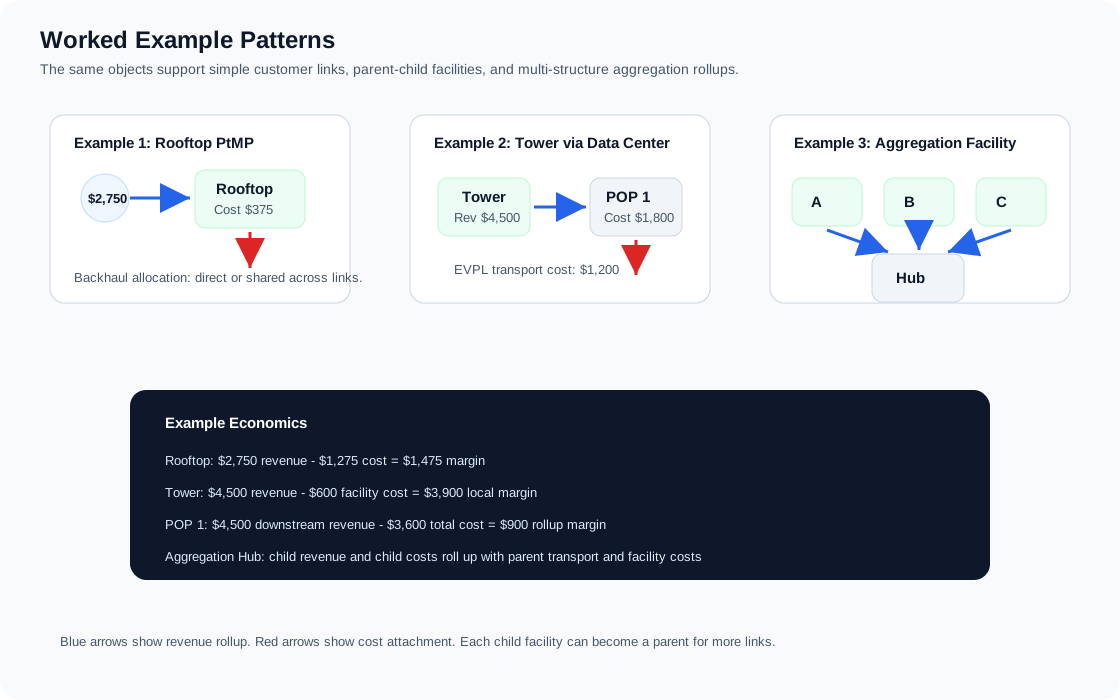
Example 1: Rooftop With PtMP Wireless Customers
Rooftop A has a Tarana base node serving five customer endpoints.
| Item | Amount |
|---|---|
| Rooftop lease | $300 MRC |
| Power | $75 MRC |
| Backhaul circuit | $900 MRC |
| Customer revenue | $2,750 MRR |
Recommended modeling:
| Record | Model |
|---|---|
| Rooftop A | Infrastructure asset with mrc_usd = 375 |
| Backhaul | Circuit with mrc_usd = 900 |
| Customer links | Five subtended links under Rooftop A |
| Backhaul allocation | Either direct to Rooftop A or allocated across customer links |
Simple rooftop economics:
direct_revenue = 2750
direct_facility_cost = 375
direct_link_cost = 900
total_cost = 1275
gross_margin = 1475
gross_margin_pct = 53.64%
Example 2: Tower Subtended by a Data Center Over Fiber
Data Center POP 1 aggregates Tower A over an EVPL circuit. Tower A serves customers.
| Item | Amount |
|---|---|
| POP 1 cabinet/power | $1,800 MRC |
| EVPL from POP 1 to Tower A | $1,200 MRC |
| Tower A lease/power | $600 MRC |
| Tower A customer revenue | $4,500 MRR |
Recommended modeling:
| Record | Model |
|---|---|
| POP 1 | Infrastructure asset with mrc_usd = 1800 |
| Tower A | Infrastructure asset with mrc_usd = 600 |
| EVPL | Circuit with A location POP 1 and Z location Tower A |
| POP 1 -> Tower A | Subtended link with downstream_infrastructure_id = Tower A, circuit_id = EVPL, cost_mrc_usd = 1200 |
| Tower A -> customers | Customer subtended links totaling $4,500 |
Tower A economics:
direct_revenue = 4500
direct_facility_cost = 600
total_revenue = 4500
total_cost = 600
gross_margin = 3900
POP 1 economics:
direct_revenue = 0
direct_link_cost = 1200
direct_facility_cost = 1800
downstream_revenue = 4500
downstream_cost = 600
total_revenue = 4500
total_cost = 3600
gross_margin = 900
Example 3: Aggregation Facility With Multiple Child Towers
Aggregation Facility A subtends three towers. Each tower has its own customers and costs.
| Child | Revenue | Facility Cost | Transport Cost From Parent |
|---|---|---|---|
| Tower A | $4,500 | $600 | $1,200 |
| Tower B | $3,200 | $500 | $900 |
| Tower C | $2,100 | $400 | $700 |
Parent facility direct cost is $2,000 MRC.
Waterfall:
| Layer | Revenue | Cost | Margin |
|---|---|---|---|
| Tower A | $4,500 | $600 | $3,900 |
| Tower B | $3,200 | $500 | $2,700 |
| Tower C | $2,100 | $400 | $1,700 |
| Parent transport to children | $0 | $2,800 | -$2,800 |
| Parent facility | $0 | $2,000 | -$2,000 |
| Total parent rollup | $9,800 | $6,300 | $3,500 |
This view answers whether the aggregation facility is economically successful after the child towers and required transport are included.
Example 4: Reparenting a Child Tower
Tower A originally rolls up to POP 1. On 2026-05-01, it is moved to POP 2.
| Link | Parent | Child | Effective From | Effective To |
|---|---|---|---|---|
| Link 1 | POP 1 | Tower A | 2025-01-01 | 2026-04-30 |
| Link 2 | POP 2 | Tower A | 2026-05-01 | null |
Link 2 should store reparented_from_link_id = Link 1.
Reports for April 2026 attribute Tower A to POP 1. Reports for May 2026 attribute Tower A to POP 2. The physical EVPL circuit endpoint should only change if the actual circuit was moved.
Waterfall Reporting Model
A complete waterfall should show how revenue and expenses flow from customer endpoints to structures and then to parent aggregation points.
Use this example scenario:
- Three customers are served from Tower A and generate $4,500 MRR.
- Tower A has $600 MRC of direct facility cost.
- POP 1 feeds Tower A with an EVPL backhaul circuit that costs $1,200 MRC.
- POP 1 has its own cabinet and power cost of $1,800 MRC.
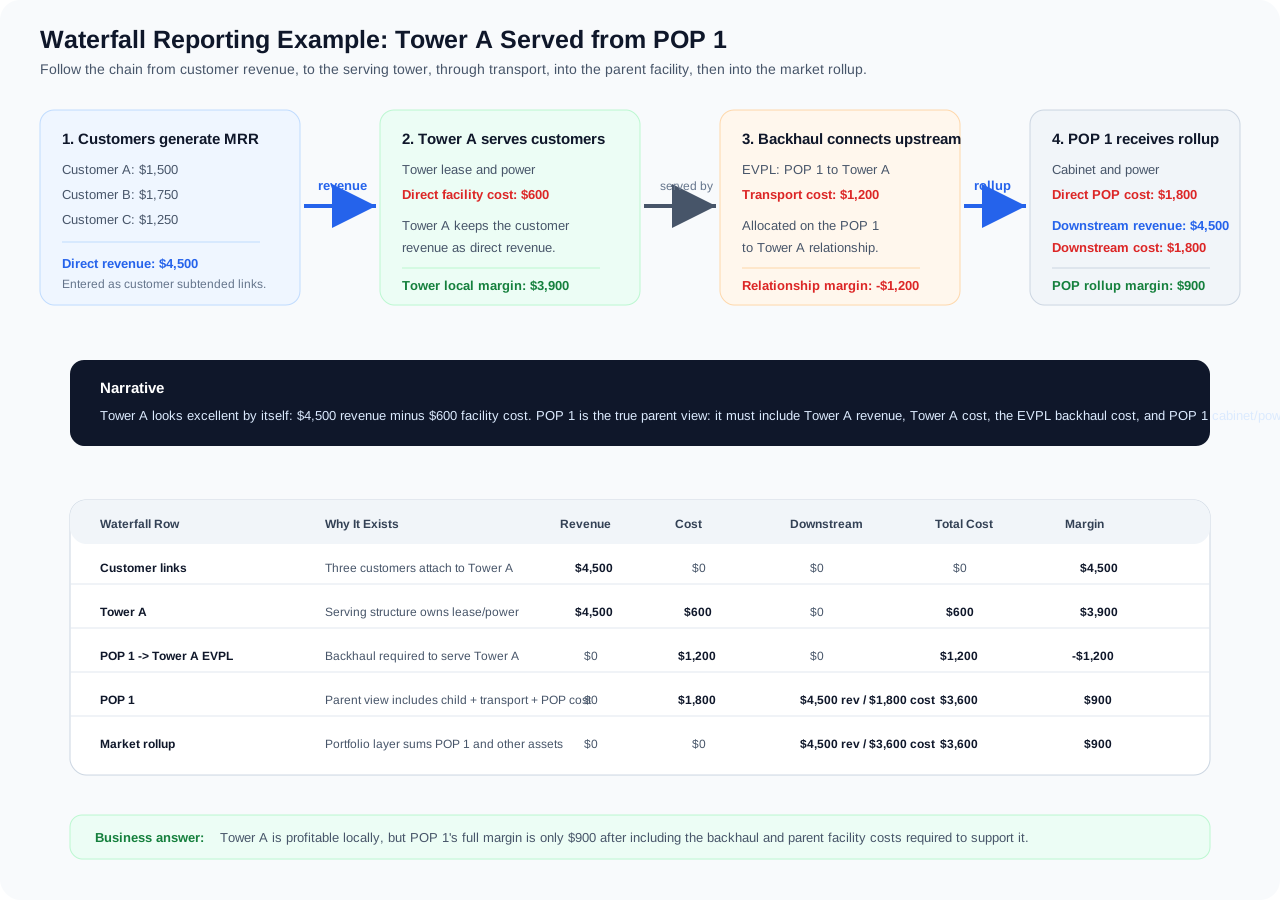
The waterfall answers two different questions. First, is Tower A locally profitable before upstream cost? Yes: $4,500 revenue - $600 facility cost = $3,900 margin. Second, is POP 1 profitable after carrying Tower A, the EVPL backhaul, and its own facility cost? Yes, but only $900 margin.
Recommended levels:
| Level | Description |
|---|---|
| Customer endpoint | End user or service endpoint revenue |
| Access link | PTP, PtMP, fiber drop, DIA resale, broadband, or cross-connect used by the endpoint |
| Serving structure | Tower, rooftop, MDU, POP, or data center directly serving the endpoint |
| Backhaul/transport | Circuits or wireless links connecting the structure upstream |
| Parent facility | Aggregation site, data center, POP, carrier hotel |
| Regional/network rollup | Market, state, provider, service type, or entire infrastructure portfolio |
Example waterfall output for the scenario above:
| Row | What It Means | Revenue | Cost | Downstream | Total Cost | Margin |
|---|---|---|---|---|---|---|
| Customer links | The customer subtended links attached to Tower A | $4,500 | $0 | $0 | $0 | $4,500 |
| Tower A | The serving structure keeps the customer revenue and owns tower lease/power | $4,500 | $600 | $0 | $600 | $3,900 |
| POP 1 -> Tower A EVPL | The backhaul relationship required to support Tower A | $0 | $1,200 | $0 | $1,200 | -$1,200 |
| POP 1 | The parent facility receives Tower A's economics and adds POP cabinet/power cost | $0 | $1,800 | $4,500 revenue / $1,800 cost | $3,600 | $900 |
| Market rollup | The portfolio layer sums POP 1 and other infrastructure assets in the market | $0 | $0 | $4,500 revenue / $3,600 cost | $3,600 | $900 |
The key point is that the same revenue can look very profitable at the serving structure level, but the parent view is more honest about the full cost to deliver that revenue. Tower A's local margin is $3,900. POP 1's rollup margin is $900 after including the EVPL and POP costs.
Drilldown Flow Labels
The financial drilldown exposes row-level revenue and expense detail so users can understand both the amount and the direction of attribution.
| Label | Meaning |
|---|---|
| Rolls Up | Revenue produced by a customer endpoint or child structure contributes upward to the serving structure, parent POP, market, and portfolio rollup. |
| Flows Down | Cost from a circuit, RF Link, or other transport path is assigned downward into the structure or endpoint that depends on that path. |
| Local | Cost belongs to the current structure itself, such as facility MRC, cabinet cost, rooftop rent, or other site-level obligation. |
For example, Lakota Lakes POP can show customer endpoint revenue as Rolls Up because the customer revenue contributes to Lakota's total revenue. Its upstream EVPL path can show as Flows Down because that transport cost is assigned from the donor path into Lakota's cost stack.
Accounting Periods
Future reporting should evaluate active relationships by period:
relationship is active for period when:
effective_from <= period_end
and (effective_to is null or effective_to >= period_start)
Monthly reports should prorate revenue and cost when a relationship starts or ends mid-month. Until proration is implemented, NetOS should use whole-month attribution and clearly label reports as non-prorated.
Recommended period rules:
| Scenario | Rule |
|---|---|
| Link active full month | Attribute full monthly value |
| Link starts mid-month | Prorate by active days, future state |
| Link ends mid-month | Prorate by active days, future state |
| Link reparented | Old parent receives value through old effective_to; new parent receives value from new effective_from |
| Facility contract escalates | Apply escalated MRC beginning on escalation date |
| Circuit billing variance exists | Use invoice actuals for closed accounting periods once invoice ingestion exists |
Recommended Data Entry Workflow
Adding a Customer Endpoint Under a Structure
- Open the serving infrastructure asset.
- Add a subtended link.
- Enter customer name, endpoint name, transport type, revenue MRR, and direct link cost if known.
- Link an existing circuit if the customer service depends on one specific circuit.
- Set
effective_from. - Save supporting documents if available.
Adding a Child Facility Under a Parent
- Open the parent infrastructure asset.
- Add a subtended link with
downstream_infrastructure_id. - Link the transport circuit if one exists.
- Put the transport cost either on the circuit record or in
cost_mrc_usdfor the subtended link, depending on whether it is already represented as a circuit. - Set the relationship effective date.
Changing a Parent Relationship
- Open the current parent relationship.
- Set
effective_toto the last valid date. - Create a new subtended link under the new parent.
- Set
effective_fromto the first valid date. - Link the new record back to the prior record with
reparented_from_link_id. - Only update circuit endpoints if the physical circuit path changed.
Open Modeling Decisions
These should be resolved before production financial reporting:
| Decision | Options |
|---|---|
| Source of customer revenue | Manual entry first, then Sonar integration |
| Cost source of truth | Contract MRC first, invoice actuals after invoice ingestion |
| Shared transport allocation | Direct, percentage, revenue share, bandwidth, subscriber count |
| Wireless equipment costs | Expense as direct link cost, facility cost, or depreciated asset |
| NRC treatment | Exclude from MRR margin, amortize across term, or report separately |
| Mid-month proration | Whole-month initially, daily proration later |
| Tax/surcharge treatment | Include in actual invoice cost or separate pass-through category |
Modeled vs. Real Revenue
NetOS shows two different revenue lenses, and it matters which one you are looking at.
Infrastructure attribution uses real revenue. Everywhere in this guide — customer detail, subtended network, structure financial summaries, the dashboard's attribution tables, and the market waterfall — revenue comes from actual entered figures: the subtended link revenue_mrr_usd override when present, otherwise the customer's contracted MRR (counted once, and zero for redundant/backup links). These numbers are as good as the data you enter and are safe to reason about directly.
Some dashboard circuit KPIs use a modeled placeholder. For headline circuit metrics that are not yet tied to a customer record — the dashboard's Modeled MRR, monthly margin, blended margin percentage, and each circuit card's margin — NetOS estimates revenue as circuit MRC × 1.35. This is a documented interim placeholder, not real billing data, and the dashboard labels the Modeled MRR tile as a temporary 1.35x sample model. It exists so the dashboard can show a plausible margin shape before Sonar revenue integration lands.
Practical guidance: trust the attribution figures (customer, structure, waterfall) for economic decisions. Treat the modeled MRR, blended margin, and per-circuit margin KPIs as directional only until real revenue is integrated. Where the financial view has an attributed-revenue figure it uses that; it falls back to the modeled number only when no attributed revenue exists.
Sonar-linked revenue replaces manual lines
Once a Sonar billing account is linked on /sonar/reconcile, Sonar is the source of truth for that customer's or property's revenue (code: apps/api/app/services/sonar_revenue.py). Revenue means recurring service charges only: services categorized revenue in the Sonar category map. Fees such as recovery and card processing, and taxes, are shown on the Sonar section but never counted.
Customers (account linked to a customer):
- Each revenue service on every linked account becomes a read-only
source = sonarservice line. Its MRC is quantity × unit price, its description is the Sonar service name, andbilling_accountholds the Sonar account id, shown as the "From Sonar #20923" badge. Its service type comes from the category map's NetOS service type when set, otherwise it's guessed from the name. Internet-like services keep the customer's previous primary type, such as DIA. - The customer's manual lines are superseded, not changed.
superseded_atis set, their status and MRC are kept, and they stop counting. Contracted MRR then equals the linked accounts' Sonar recurring revenue, with no double counting. Several accounts can drive one customer, as with Canal Pointe's #20923 + #20924. - A customer with a hand-entered contracted MRR but no service lines gets a "Pre-Sonar contracted MRR" manual line when it is first linked, so the value can be restored later.
- Every Sonar sync (nightly or Sync now) refreshes the lines of each linked customer whose account it touched. Price changes update the line. A service that disappears or is re-categorized away from
revenueis retired (statuscancelled, end date set), never deleted. It is reactivated if it comes back. Category edits apply on the next sync. - Unlinking an account retires its lines. Unlinking the customer's last account also clears
superseded_aton the manual lines, so the prior MRR comes back exactly. - While a customer is linked, the API rejects edits and deletes on Sonar lines (409), rejects new manual lines (409), and rejects a direct contracted-MRR edit (422) unless it re-submits the current value.
variance_at_linkrecords NetOS MRR before the link (the hand-entered baseline, even for a second account) and after it, plus the account's own recurring revenue and the difference.
Properties (residential/tenant accounts linked to a property):
property_active_mrrreturnsrevenue_mrr_usd = tenant_mrr_usd + sonar_residential_mrr. The Sonar term is the recurring revenue of accounts linked to the property itself. That total already feeds property attribution (allocated_link_revenueandattributed_link_revenue), so it reaches the parent infrastructure and the dashboard with no other change. The property page shows the split as "Tenants $X + Sonar residential $Y".- No double counting: an account has at most one active link. An account linked to a tenant customer is therefore inside that tenant's contracted MRR and never also counts at property level.
With no links, nothing changes: no customer is touched and the property term is $0.
When Sonar stops billing, NetOS stops counting:
- Only linked accounts that Sonar is actively billing count (
sonar_accounts.is_active_billing, true when the Sonar status contains the whole word "active"; Cancelled and Inactive are not billing). This applies to both customers and properties. - Customer: the services of a non-billing account are no longer wanted, so its Sonar lines are retired (status
cancelled, end date set). The account stays linked, so the manual lines stay superseded. If every linked account stops billing, the customer's contracted MRR becomes $0. Sonar is the source of truth. If billing resumes, the same lines are reactivated and the MRR comes back. - Property:
property_sonar_residential_mrrskips non-billing accounts, so the "Sonar residential" term drops by exactly that account's recurring revenue. - The hierarchy updates straight away. Site rollups, the dashboard, attribution and the financial views are all computed at request time from
contracted_mrr_usdandproperty_active_mrr. No economics are cached or stored, so re-deriving the customer's lines at sync time is the only refresh needed. - The Sonar section still lists a non-billing account with its status and a "Not billing — not counted" badge. Its section totals count billing accounts only.
Every billing change is recorded and users are told (code: apps/api/app/services/sonar_billing_events.py, table sonar_billing_events):
- On each sync, when a linked account that was synced before changes, NetOS records an event. The types are
billing_stopped,billing_resumed, orrevenue_changed(the recurring revenue of a billing account moved by more than $0.01). Each event stores the status before and after, the revenue NetOS counted before and after, the change, the target's name, and the sites whose financials moved. Those sites are the parents of the target's active subtended links (for a tenant, its property's links) plus the other sites on its primary serving path. Unlinked accounts, an account's first-ever sync and dry runs never create events. - A billing flip always recomputes that customer's revenue in the same sync, even outside the usual "accounts touched this run" filter.
- Alerts page: each unacknowledged event is a Billing alert (critical for stopped billing, warning for a price change, info for resumed billing). The alert links to the customer or property, for example: "Sonar stopped billing account #20923 (Cancelled). $200.00/mo removed from NetOS revenue; Majestic Building's financials updated." Billing alerts are shown only to users who can view customer financials.
- Customer and property Sonar section: a banner lists the unacknowledged changes, with Acknowledge buttons for users with
customers_edit. - `/sonar/reconcile` → Billing changes: lists all events, newest first, filtered to unacknowledged or all. Events can be acknowledged one at a time or in bulk. The
?tab=billinglink opens this tab directly. - Email: after a real (non-dry) sync that recorded events, NetOS sends one summary email to the admin address. It gives totals (for example "3 accounts stopped billing, -$X/mo") and links built from the notification settings' public base URL. Sending is best effort: a failure is logged and never fails the sync.
- API:
GET /api/v1/sonar/billing-events(filterstarget_kind,target_id,acknowledged; needscustomer_financial_view) andPOST /api/v1/sonar/billing-events/acknowledge {ids}(needscustomers_edit).
Rule 9: one account, several locations (service-line attribution) (code: apps/api/app/services/sonar_service_assignments.py, sonar_service_suggestions.py, rule 9 in sonar_revenue.py; table sonar_service_assignments, migration 0087):
A Sonar account can bill several locations on one invoice. Sonar invoices only carry totals, so the location comes from each account service's name_override, for example Fishers Imports NE (#10722): "250 Mbps Internet (9550 E 126th St)", "Wireless Relay (12655 Parkside Dr)" and "250 Mbps Internet (4529 West 96th Street)". The sync caches it in sonar_account_services.name_override.
- Effective target of a service line: its active assignment, else its account's link target, else nothing. An account-level link sets the default for every line; an assignment overrides it for that one line. A line of an unlinked account can be assigned too.
- Customer revenue: the revenue lines of its linked accounts that are not assigned elsewhere, plus every revenue line assigned to it from any account. Each becomes a read-only Sonar service line as in rule 1.
- Rule 3 (supersede manual lines) applies once the customer has any Sonar source: a linked account or an assigned line. Clearing its last assigned line (and having no link) restores the manual MRR exactly.
- Rules 7 and 8 use the accounts contributing to that customer. A line from an account Sonar isn't billing counts $0. An assigned line Sonar hasn't priced keeps the customer's NetOS MRR. A linked account whose only unpriced lines are assigned elsewhere no longer holds its link target back.
- Property revenue: the Sonar term is the revenue of property-linked accounts minus the lines assigned away, plus the lines assigned to the property.
- Nothing is double counted. Each line has exactly one effective target, so the hierarchy (site rollups, dashboard, attribution) gets exactly each target's share, and the total equals the account-level total.
- Re-sync: assignments are keyed by the stable Sonar ids (account +
sonar_account_service_id), so they survive re-syncs. A price change reaches the assigned line. If Sonar stops reporting a service, its assignment is soft-retired (retired_at) and its line retires (rule 2); it comes back with the service. - Billing events: moving a line is a revenue change for both targets. Each affected target gets a
revenue_changedevent withdetails.reason = "service_reassigned". Sync-time billing events also cover targets fed only by assigned lines. - Previews:
POST /api/v1/sonar/service-assignments/previewruns the change in a rolled-back transaction and warns when a target's MRR would drop (same thresholds as the link preview). The link preview lists a linked account's lines assigned elsewhere (reassigned_lines) and excludes them from the after amount. - Suggestions, never automatic: the location is parsed from
name_override(the parenthesized address, or the text after " - " / " @ "; order references such as "(#11833)" are ignored) and normalized withcanonical_address_key, using the account's city and state when the line has none. A customer or property at the same canonical address is a High suggestion. One within 150 m of a NetOS record or site already geocoded at that address is Medium (High with a similar name). A place name ("Celedon") similar to a customer/property name, or a site at the address and what it serves, are also suggested. - API:
GET /api/v1/sonar/accounts/{id}/services(every line with category, amount, parsed location, effective target and suggestions),POST /api/v1/sonar/service-assignments(bulk;target: nullclears back to the account default),POST /api/v1/sonar/service-assignments/preview,DELETE /api/v1/sonar/service-assignments/{id}. Reads needbilling_reconcile_view, writesbilling_reconcile_edit.GET /sonar/links?customer_id|property_idincludesassigned_in(lines assigned from other accounts) and marks each linked account's lines assigned elsewhere. - UI: reconcile cards for accounts with two or more revenue lines, or a line whose location differs from the account address, show a Service lines (N locations) expander with per-line suggestions, Assign to…, Use suggestion, Same as account and Accept all suggestions. The customer and property Sonar sections list lines assigned in ("from Sonar #10722 · 9550 E 126th St") and let billing users move a line.
With zero assignments every number is exactly as under rules 1-8.
- Suite-level lines (Stephen, 2026-09-24): a line naming a suite or unit ("Internet (Suite 122)", "... Ste 103", "- #103", "Unit 1A", "Apt B-3", "Rm 2", "Space 4") is matched to tenant customers in that suite. "Suite 122", "Ste 122" and "#122" are the same token. Candidates are customers at the same building: the same base address (canonical key without the unit) as the line's own address, or the account's address when the line only names the unit; or
customers.property_idequal to the building's property (the account's link target, its linked customer's property, or a property at the account's address). The customer's suite comes from its address (address_line_1oraddress_line_2) or its name. High = base address and suite both match; Medium = the suite matches only by name, or the building only by property. Customers at that building with a different suite are not suggested, and a suite number is never matched without the building. The reason chips read "Same building" and "Suite 122 matches". A 5-digit "#11832" is still an order reference, and the equipment and phone filters still apply.
Rule 10: non-billing assigned lines are flagged, not zeroed (Stephen, 2026-09-24; code: rule 10 in sonar_revenue.py, billing_review_flags; migration 0089 adds reviewed_at, reviewed_by and reviewed_status to sonar_service_assignments):
- A customer with no account-level link whose every assigned line comes from an account Sonar isn't billing is not Sonar-driven. Its manual lines are not superseded, so it keeps its NetOS MRR, and it is marked needs billing review. Manual lines stay editable.
- Customers with an account-level link keep rule 7: when billing stops, revenue goes to $0 and a billing event is recorded.
- Mixed: lines from billing accounts count as usual, and each line from a non-billing account is flagged ("not counted").
- Properties: a line assigned in from a non-billing account still adds $0, and the property is flagged.
- A line assigned to its own account's link target is covered by rule 7 and is never flagged.
- Billing events: a billing stop that leaves an assignment-only customer with no billing Sonar source records no event, because its revenue didn't drop; the flag replaces it. When billing resumes, the event carries
details.netos_mrr_was_kept, and its message says Sonar drives the customer again. - Where the flag shows:
- Alerts: "Billing" category, warning, for example "Sonar line '250 Mbps (4529 W 96th St)' from account #10722 isn't billing — NetOS MRR kept, review the assignment". Only shown with
billing_reconcile_view. - Customer/property Sonar section: a Needs billing review banner with Keep NetOS MRR (dismiss), Move line… and Same as account.
- Revenue reconciliation: under "In NetOS, not billing in Sonar", the group "Assigned lines not billing — review". Reviewed lines appear in a collapsed "Reviewed: NetOS MRR kept" group that is not in the total. Customers fed by an assigned line are no longer listed under "Contracted MRR, no Sonar account linked".
- Dismiss:
POST /api/v1/sonar/service-assignments/{id}/review(billing_reconcile_edit) setsreviewed_at/reviewed_by/reviewed_status. The flag stays quiet until the account's billing state flips; the sync then clears the review, so the flag comes back if the account stops billing again. Moving or clearing the line removes the assignment and its flag. - Previews: the assignment preview returns
billing_reviewnotes (for example "… keeps its NetOS MRR and is flagged for billing review"), and the UI asks for confirmation. Both the link and the assignment previews run the real rules in a rolled-back transaction, so their before/after numbers follow rule 10.
Current Implementation Status
Implemented:
- Infrastructure assets have direct
mrc_usdandnrc_usd. - Circuits have direct
mrc_usdandnrc_usd. - Infrastructure detail supports multiple supporting documents.
- Infrastructure detail supports subtended links.
- Subtended links can reference child infrastructure, customer endpoints, circuits, and RF Links.
- Subtended links include effective dates, allocation method, allocation percent, inherited allocation method/percent, redundancy role, and reparent lineage.
- Redundant/backup links (
redundancy_role = secondary) attribute cost to the backup facility while contributing zero implicit revenue, with an explicit revenue override still honored. A Backup badge marks them in the UI. - Infrastructure assets carry a cost classification (
operating,pre_revenue,strategic_redundancy,market_overhead) that controls whether facility MRC participates in operating margin and inherited donor cost. - Inherited donor cost flows down through the serving chain using revenue pro rata by default, with manual-percent and direct rows consuming the shared cost pool first and calculated rows splitting the remainder.
- RF Link calculated monthly cost uses RF MRC plus tower rent MRC. CAPEX is tracked on the link and is not included in monthly margin unless a future amortization model includes it.
- Infrastructure sites carry CAPEX; straight-line depreciation (default 120-month life) is added to site cost and shared down the hierarchy like facility rent, with payback months and annualized ROI per site (see Site CAPEX and Depreciation).
- Infrastructure economics roll up direct revenue, direct costs, downstream revenue, downstream costs, total cost, total revenue, and margin.
Next recommended implementation steps:
- Add a guided "Change Parent" action that closes the old link and creates the new one atomically.
- Add edit support for existing subtended links in the UI.
- Add accounting-period filters and historical waterfall reporting.
- Add allocation calculators for revenue share, bandwidth, and subscriber count.
- Integrate Sonar customer revenue as the revenue source of truth.
- Integrate invoice actuals as the expense source of truth for closed periods.
- Add exportable waterfall reports by asset, market, provider, and month.